- Stubbuilder
- Feb 13, 2026
How to Get a Money Network Paystub?
Accessing the Money Network paystub is vital for managing your finances, filing taxes, and applying for loans. If your employer uses Money Network to distribute your wages, you might be wondering how to view and download your pay stubs easily. By using a paystub generator free, you can also generate an accurate paystub for your business.
This guide on Money Network will help you access the paystub portal and help employees get their pay stubs easily without any hassle.
What is Money Network?
Money Network is a payroll service provider that allows employers to pay their employees via prepaid debit cards or direct deposit access. Many employers use the Money Network EDD to issue pay stubs electronically, making it easy for employees to access earnings online without receiving a paper check stub.
Along with the wage payments, Money Network provides access to:
- Earnings statements
- Paystubs
- Tax-related payroll details
What are Money Network paystub?
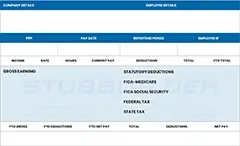
A Money Network paystub shows how much you earned, what has been deducted, and what you actually received for a specific pay period.
- Money Network payroll debit card.
- Direct deposit linked to Money Network.
- An employer’s payroll system is integrated with Money Network.
Who can access the Money Network paystub?
You can access the Money Network paystub if:
- Your employer uses Money Network for payroll
- You received earnings via a Money Network card
- You have login credentials linked
How to get a Money Network Pay Stub as a Current Employee?
Many huge employers provide payroll through Money Network. These include retail chains, logistics firms, and agencies. If you work there, you will get a Money Network debit card, and you will use the same portal. Below are the methods to get paystubs from the same portal.
- Visit the official website of Money Network.
- In the top right corner, click on the Login button.
- Once on the portal dashboard, click on Register now.
- You will need your personal details to register by using the Money Network sign-in.
- If you’re already registered, you can use the confirmed login details to access the portal.
- Once logged in, look for a section like earnings.
- Click on pay stubs and choose the pay period you want. Your pay stub will appear.
- Your paystub will appear as a PDF for download.
How to get a Money Network Pay Stub as a Former Employee?
A former employee can still access their Money Network checkstub. Follow the instructions given below:
- Log in using old credentials: Employers allow portal access for various months after termination.
- Contact former employer: Reach out to your former employer. If access is scraped:
-
- Reach out to the HR department
- Request copies of your paystub
- Contact Money Network Support Team: The Money Network support team will help you with account recovery, login issues, and verifying whether paystub access is available.
Can you use the Paystub Portal Money Network Mobile App?
Yes, Money Network offers a mobile application for its cardholders. The app is a secure way to keep track of your earnings from the word go. You can visit the app to check your account balance, see your transactions, and manage your piggy bank.
Many companies that use Money Network for payroll also have a Money Network debit card. But, you should keep in mind that pay stubs themselves are accessed through the web portal and not the mobile app.
In other words, the Money Network app is best for managing your card account. To visit the Money Network portal to view the actual paystub.
Are Money Network Checkstub Legal Proof of Income?
Yes, Money Network check stubs are accepted as a valid proof of income. Keep these things in mind:
- Loan applications
- Tax filing
- Apartment rentals
- Employment verification
Ensure that the Money Network paystub shows:
- Employee name
- Employer name
- Pay period
- Gross pay
- Net pay
Key Takeaways
Receiving your Money Network paystub is usually a simple process once you know where to look. Whether you’re using an online portal, mobile app, or employer HR system, your earnings records are accessible with the right credentials. If you’re a former employee and experiencing login issues, don’t panic. Your employer and Money Network support can help you reclaim past payments. Always save copies regularly to avoid future troubles.
FAQs
1- What is Money Network Payroll?
The Money Network service payroll helps in simplifying and optimizing your payroll delivery and reducing administrative costs with a digital payroll service.
2- Is Money Network safe to use?
The Card account is FDIC-insured and follows all the Regulation E Requirements for consumer protection.
3- Does Money Network pay early?
With Money Network’s new feature, you can get paid after each workday and always have money available for the things you need the most.
4- Does Money Network have a monthly fee?
Your Account Maintenance Fee will be billed on your Account once a month.
5- Is Money Network 24 hours?
The Money Network Customer Service representative at 24 hours a day, 7 days a week by contacting: 1-800-684-7051.
6- How to transfer money network to a bank account?
Click on the top left menu and then click on Send Money to an External Bank Account under the Move Money Out section.